Author
Prem Chandran
Microsoft Copilot Cowork introduces a new way of working with AI, and a new way of budgeting it.
Unlike traditional Microsoft 365 licensing, where organizations can forecast costs largely by counting seats, Copilot Cowork uses a consumption-based model. Organizations still need Microsoft 365 Copilot licensing, but Copilot Cowork activity is billed separately based on the work it performs.
That shift matters because Copilot Cowork is not simply answering prompts. It can complete complex, long-running, multi-tool tasks across Microsoft 365. You define the outcome, and Cowork works toward a completed result, whether that means gathering context, creating documents, sending communications, scheduling meetings, or managing files.
For IT, finance, and business leaders, the question becomes practical:
How do you estimate what Copilot Cowork will actually cost before usage scales across the organization?
The answer starts with understanding the variables that drive consumption.
What Are Copilot Cowork Credits?
For an introduction to Copilot Cowork, read our blog.
To use Copilot Cowork, organizations require a Microsoft 365 Copilot license. Beginning July 1, 2026, the work completed by Cowork is measured through Copilot Credits and billed separately through a consumption-based model.
A Copilot Credit is a metered unit that tracks AI-powered activity across Microsoft's automation and AI ecosystem, including:
- Copilot Cowork
- Copilot Studio
- Power Automate
- Power Apps
Why Copilot Cowork Costs Are Different
Most Microsoft 365 budgeting starts with a predictable formula: number of users multiplied by license cost.
Copilot Cowork changes that model.
Because Cowork performs work on behalf of users, Microsoft measures usage through Copilot Credits. Copilot Credits are the common currency Microsoft uses for eligible usage-based AI experiences, including Copilot Cowork, Work IQ APIs, Microsoft Copilot Studio, Dynamics 365 agents, and Power Platform AI workloads.
In other words, the cost is not based only on whether someone has access. It is based on how much AI-powered work is actually being performed.
A user who occasionally asks Cowork to summarize information may consume far fewer credits than a user who regularly asks it to analyze data, coordinate actions across systems, and generate multiple deliverables.
That makes cost estimation less about counting licenses and more about modeling behavior.
The Consumption-Based Model: How Microsoft Calculates Credit Consumption
Microsoft describes Copilot Credits as the metered unit used to measure AI-powered activity across services such as Copilot Cowork, Copilot Studio, Power Automate, and Power Apps.
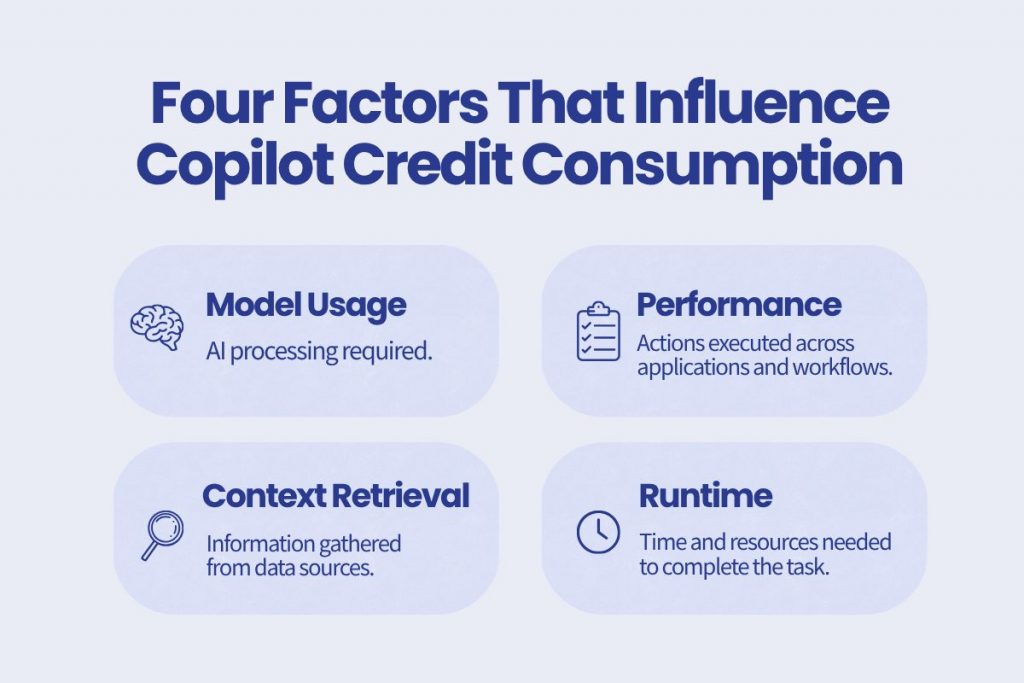
One of the biggest questions organizations have is whether every Copilot Cowork task costs the same. The answer is no. According to Microsoft, credit costs are determined using four components: model usage, context retrieval, tool calls, and runtime, helping align costs with the actual work being performed.
Model Usage
Every task requires AI processing power. The amount of model usage depends on the complexity of the request and the level of reasoning required to generate a result. For example, summarizing a document requires fewer resources than analyzing multiple sources, identifying trends, and producing recommendations.
Context Retrieval
To complete many tasks, Copilot Cowork needs to gather information from Microsoft 365 and connected business systems. This may include emails, Teams conversations, SharePoint documents, meeting notes, or other organizational data. The more information Cowork needs to locate, retrieve, and process, the more credits may be consumed.
Tool Calls
Copilot Cowork can leverage tools and integrations to perform actions or collect information. For example, it may access Microsoft 365 services, trigger workflows, or interact with connected business applications. Each of these actions contributes to the overall resources required to complete a task.
Runtime
Some tasks can be completed in seconds, while others may run for an extended period as they process large amounts of data or execute multiple steps. Runtime reflects the amount of time and computing resources required for Cowork to successfully complete a request. Generally, longer-running tasks will consume more credits than shorter ones.
Think of Copilot Credits like cloud consumption: you’re not charged based on how many prompts you submit, but rather on the amount of work required to complete them. A quick summary may use relatively few credits, while a complex research or analysis task that pulls information from multiple sources will naturally consume more.
Think in Task Complexity, Not Just Prompts
A common mistake is trying to estimate Copilot Cowork costs by counting prompts.
That is too simplistic.
The better approach is to group expected usage into task types: light, medium, and heavy. Microsoft's Copilot Credits guidance uses this kind of scenario-based approach to help organizations reason through usage intensity and planning estimates.
Light Tasks
Light tasks usually involve narrow context, limited reasoning, minimal tool use, and one or fewer deliverables.
Examples may include:
- Creating a short weekly status update
- Summarizing a small amount of information
- Drafting a simple communication
- Pulling together a quick list of priorities
These tasks are useful, but they typically represent a lower level of consumption.
Medium Tasks
Medium tasks involve richer context, more reasoning, several tool calls, and two or more outputs.
Examples may include:
- Preparing for a customer meeting using emails, calendar items, CRM data, and recent files
- Creating a briefing document from multiple sources
- Analyzing several documents and producing recommendations
- Gathering updates and drafting a stakeholder summary
These are often the tasks where Cowork begins to create more visible business value.
Heavy Tasks
Heavy tasks involve broad context aggregation, deeper reasoning, many actions, sustained runtime, and multiple deliverables.
Examples may include:
- Analyzing months of product usage data
- Producing a leadership-ready analysis
- Comparing large volumes of documents
- Coordinating work across multiple systems and outputs
These tasks may consume more credits, but they may also replace work that would otherwise take employees hours or days to complete.
How to Estimate Copilot Cowork Costs
The most useful way to estimate Copilot Cowork costs is to build a simple usage model.
Microsoft's Customer Cowork Estimator is designed to help organizations model expected usage and get a directional view of potential costs. It uses a step-by-step approach where organizations estimate who will use Cowork, how often they will run light, medium, and heavy tasks, and how many Copilot Credits those tasks may consume.
A practical estimation process looks like this:
Step 1: Identify Who Will Use Copilot Cowork
Start by defining the user groups most likely to use Cowork.
Microsoft's estimator organizes users into personas such as corporate knowledge workers, customer-facing knowledge workers, technical workers, and managers or senior leaders.
This matters because not every user will use Cowork the same way.
A manager may use Cowork for executive briefings, weekly updates, or meeting preparation. A technical worker may use it for deeper analysis, documentation, or multi-step workflows. A customer-facing employee may use it for account research, customer summaries, or follow-up preparation.
The goal is not to assign one average across the whole organization. The goal is to understand how different groups are likely to use Cowork differently.
Step 2: Estimate Monthly Task Volume
Next, estimate how many light, medium, and heavy tasks each user group may run per month.
This is where organizations should be realistic.
Early in adoption, usage may be experimental and uneven. Some users may only try Cowork occasionally, while others may quickly begin using it for recurring workflows.
A good starting point is to model a few scenarios:
- Conservative adoption
- Expected adoption
- High adoption
This gives leaders a range instead of a single number.
Step 3: Apply Credit Assumptions by Task Type
Once you estimate task volume, apply an expected Copilot Credit range or assumption for each task type.
Microsoft's guidance emphasizes that actual usage will vary based on workflows, usage patterns, and complexity. The estimator is meant to provide a directional planning view, not a guaranteed cost outcome.
This is important for setting expectations. The purpose of estimation is not to predict every task perfectly. It is to create a useful planning model that can be refined as real usage data becomes available.
Step 4: Calculate Monthly Credit Spend
After estimating users, task volume, and credit assumptions, organizations can calculate estimated monthly Copilot Credit consumption.
At a high level, the model is:
Number of users × expected task volume × estimated credits per task = estimated monthly Copilot Credit usage
From there, organizations can translate estimated credits into budget using their applicable purchasing model.
Step 5: Review and Refine Over Time
Cost estimation should not be a one-time exercise.
As employees begin using Cowork, organizations should compare estimated usage against actual consumption. Microsoft's Cost Management dashboard in the Microsoft 365 admin center provides visibility into Copilot Credit usage, spending trends, budgets, alerts, and usage drivers.
This allows leaders to adjust assumptions, refine policies, and identify where Cowork is creating the most value.
Pay-As-You-Go vs. Pre-Purchase: Which Model Makes Sense?
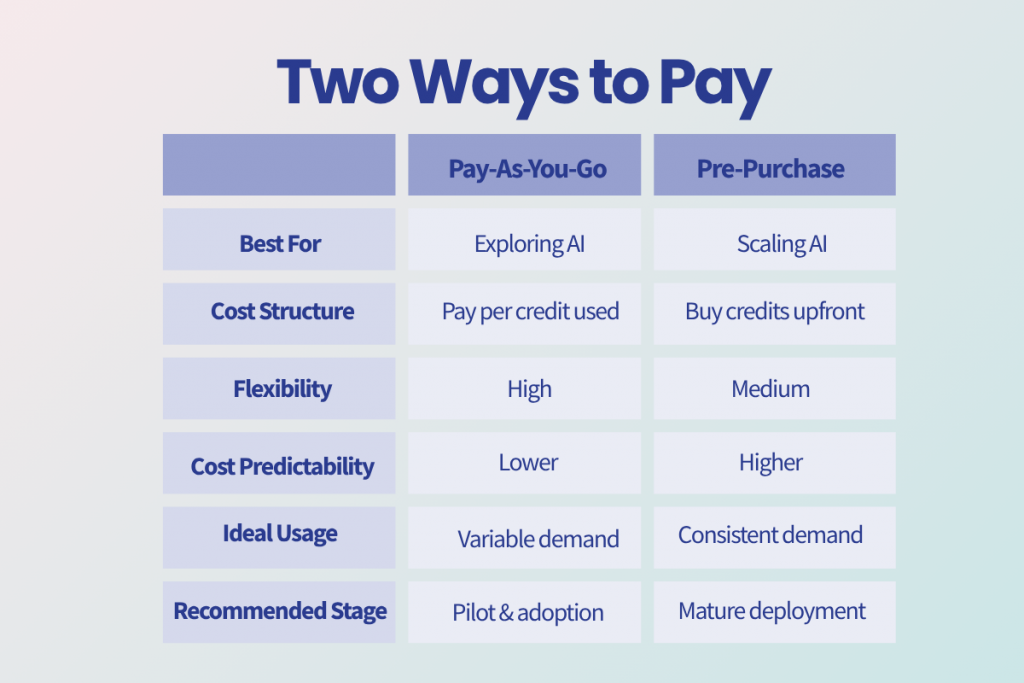
Microsoft provides two primary purchasing options for Copilot Credits: pay-as-you-go and the Copilot Credit Pre-Purchase Plan.
Pay-As-You-Go
Pay-as-you-go is useful when usage is still uncertain.
With this model, organizations are billed based on the actual number of Copilot Credits consumed in a billing month. Microsoft lists pay-as-you-go pricing at $0.01 per Copilot Credit.
This model may be a good fit when:
- You are piloting Copilot Cowork
- Usage patterns are not yet predictable
- Adoption is limited to a small group
- You want flexibility before committing to volume
For many organizations, pay-as-you-go will be the safer starting point because it allows real usage data to shape future budgeting decisions.
Pre-Purchase Plan
The Copilot Credit Pre-Purchase Plan allows organizations to purchase a pool of credits upfront for an annual term. Microsoft's guide notes that unused credits expire at the end of the annual term, making accurate forecasting important.
This model may be a better fit when:
- Usage is predictable
- Adoption has already scaled
- The organization has strong confidence in its forecast
- Finance teams want more budget predictability
- The expected volume justifies a commitment
The key is to avoid committing too early. A pre-purchase model can support cost predictability, but only when the organization has enough real usage data to size the commitment responsibly.
Best Practices for Managing Costs
The move to usage-based billing gives organizations greater flexibility, but it also means AI consumption should be managed with the same level of oversight as cloud services, licensing, and other technology investments. The goal isn’t to limit innovation, it’s to ensure that every credit consumed delivers measurable business value.
Focus on High-Value Tasks First
When introducing Copilot Cowork, it’s important to start with use cases that can generate meaningful business impact. While employees may be tempted to use Cowork for simple tasks, organizations will see the greatest return when it handles work that would otherwise require significant time and effort.
For example, tasks such as compiling reports, conducting research across multiple sources, analyzing large volumes of information, or executing multi-step business processes are often better candidates than quick information requests. By prioritizing high-value scenarios, organizations can maximize productivity gains while better understanding their consumption patterns.
Monitor Usage Early and Often
Because task costs vary based on complexity, organizations should establish visibility into usage from the beginning. A user who runs occasional research tasks may consume far fewer credits than someone using Cowork to execute complex workflows every day.
Monitoring usage allows IT and business leaders to identify trends, understand where credits are delivering value, and uncover opportunities for optimization. Early visibility can also help prevent unexpected costs as adoption grows across departments.
Build Governance Into Your AI Strategy
As AI becomes more capable, governance becomes increasingly important. Organizations should provide guidance on when Copilot Cowork should be used, what types of tasks are appropriate, and how employees can make informed decisions about consumption.
Clear governance policies help balance innovation with accountability. Rather than restricting usage, they create a framework that encourages employees to use AI strategically and responsibly while maintaining cost predictability.
Choose the Right Billing Model for Your Organization
Microsoft’s Pay-As-You-Go and pre-purchase plans provide flexibility for different stages of AI adoption. Organizations that are still exploring use cases may benefit from the agility of Pay-As-You-Go, while those expecting consistent, large-scale usage may find better value in a pre-purchase commitment.
The right approach depends on your organization’s adoption maturity, expected volume, and budgeting requirements. Reviewing usage trends regularly can help determine whether your current billing model continues to align with your needs.
Treat AI Consumption Like Any Other Business Investment
Ultimately, Copilot Cowork should be viewed as a business productivity platform, not simply another software feature. Every credit consumed represents work being completed on behalf of employees. The most successful organizations will be those that connect AI usage to measurable outcomes, such as time savings, process improvements, faster decision-making, or increased employee productivity.
By combining visibility, governance, and strategic adoption planning, organizations can confidently scale Copilot Cowork while maintaining control over costs and maximizing the value of their Microsoft 365 investment.
How to Keep Copilot Cowork Costs Predictable
Because Copilot Cowork runs on usage-based billing, organizations need a governance model before broad rollout.
A strong cost-management approach should include:
Start With High-Value Use Cases
Do not begin by encouraging employees to use Cowork for everything.
Start with workflows where Cowork can replace meaningful manual effort, such as preparing executive briefings, compiling reports, analyzing large information sets, coordinating project updates, or creating structured deliverables.
These scenarios make it easier to connect credit consumption to business value.
Create Usage Guidelines
Employees should understand when Cowork is the right tool for the job.
For example, a quick Copilot Chat prompt may be enough for a simple answer or draft. Cowork may be more appropriate when the task requires multiple steps, multiple sources, actions across tools, or a completed deliverable.
This helps prevent unnecessary consumption while encouraging strategic use.
Set Budgets and Alerts
Cost controls should be active from the beginning.
Budgets and alerts help organizations identify unusual usage patterns before they become unexpected costs. Microsoft’s cost management capabilities include visibility and controls that allow administrators to monitor and manage Copilot Credit spend.
Review Usage by Department
Different teams will use Cowork differently.
Marketing may use it for campaign planning and content workflows. Sales may use it for account research and follow-up preparation. Operations may use it to coordinate processes and reporting. Leadership may use it for briefings and decision support.
Department-level review helps organizations understand where Cowork is being used and where it is delivering the strongest value.
Refine the Estimate as Adoption Grows
Your first estimate will not be perfect.
That is expected.
The purpose of an initial cost model is to create a planning baseline. As usage grows, organizations should use actual consumption data to refine forecasts, adjust policies, and decide whether pay-as-you-go or pre-purchase makes more sense.
The Bottom Line
Estimating Copilot Cowork costs is less about counting licenses and more about modeling usage.
The organizations that succeed will focus on:
- High-value workflows
- Expected adoption
- Consumption visibility
- Business outcomes
Forecast the workload, monitor actual usage, and continually optimize spend as adoption grows.