Author
Prem Chandran
Why Adding More Tools Is Slowing Your Organization Down
The Hidden Cost of Solving Every Problem with Another Tool
If you’re responsible for managing technology in your organization, you’ve likely experienced this scenario before.
A department identifies a business challenge and finds a tool that promises to solve it.
- Marketing wants a new collaboration platform.
- HR needs a new document repository.
- Operations discovers a workflow automation solution.
- Project teams adopt a new task management application.
Individually, each decision seems reasonable. The problem is what happens over time.
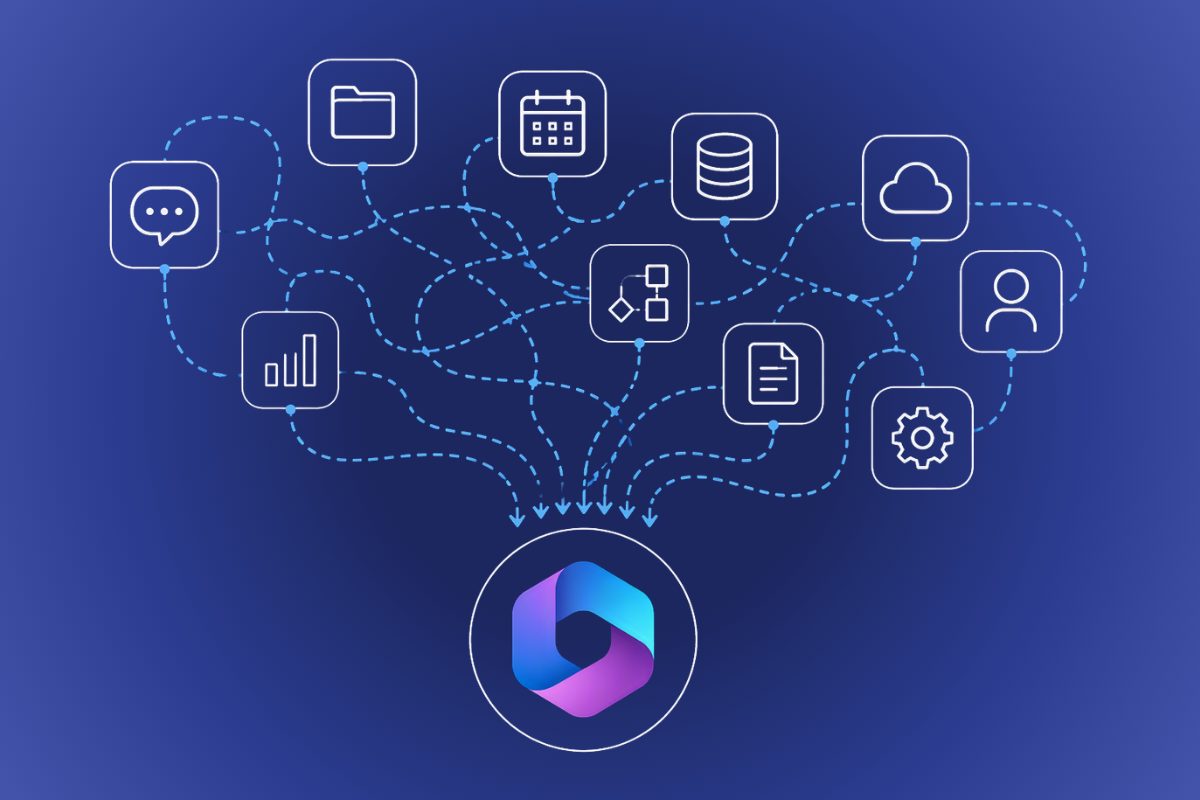
What starts as a handful of business applications can quickly become a complex ecosystem of disconnected platforms, overlapping capabilities, and growing administrative overhead. Before long, IT isn’t just supporting the business. It’s spending increasing amounts of time supporting the tools used to support the business.
The challenge facing many organizations today isn’t a lack of technology. It’s managing the technology they already have.
When More Tools Create More Problems
Technical debt is rarely intentional. It usually starts with treating a new application’s purchase as the finish line, when it’s just the beginning.
Every new platform introduces additional responsibilities for IT teams:
- User provisioning and deprovisioning
- Identity and access management
- Security configuration
- Vendor management
- License administration
- End-user support
- Compliance oversight
- Data governance
- Integration maintenance
- Platform updates and lifecycle management
The more tools an organization introduces, the more fragmented these responsibilities become.
Instead of focusing on strategic initiatives, IT teams often find themselves spending significant time maintaining and troubleshooting a growing collection of systems.
Adding another tool might solve a short-term problem. It can also create a long-term operational burden. What starts as five core platforms can eventually become 20, 30, or even 50 different tools supporting daily operations.
Technology Sprawl Creates Technical Debt
Most organizations don’t intentionally create technical debt.
It accumulates gradually.
- A merger introduces new systems.
- A department purchases software independently.
- A temporary solution becomes permanent.
A new business requirement results in another application entering the environment.
Over time, technology decisions made in isolation begin to create unintended consequences.
For IT teams, technical debt often shows up as:
- Duplicate platforms performing similar functions
- Inconsistent security controls
- Multiple identity stores
- Complex user onboarding processes
- Disconnected data repositories
- Governance gaps
- Licensing sprawl
- Documentation that no longer reflects reality
The issue isn’t necessarily that any individual tool is bad.
The issue is that complexity compounds.
As complexity grows, visibility decreases, making it harder to understand where risks and inefficiencies exist.
Employees Feel the Impact Too
Technology sprawl rarely stays an IT problem. Eventually, it becomes a business problem.
Employees are asked to manage multiple logins, platforms, interfaces, and workflows. Information becomes scattered across different systems, making it difficult to find the latest version of a document or the right place to collaborate.
The result is often:
- Reduced user adoption
- Duplicate work
- Shadow IT
- Increased support requests
- Slower onboarding
- Lower productivity
- Ironically, the tools introduced to improve efficiency can end up creating friction instead.
Microsoft 365 Can Reduce Complexity When Used as a Platform
As a Microsoft Solutions Partner, our team runs Microsoft 365 Value & Risk Assessments across organizations of every size, and the same pattern shows up again: companies purchasing additional solutions without fully utilizing the Microsoft 365 capabilities they already own.
This isn’t just about replacing third-party tools with Microsoft products. It’s about reducing unnecessary complexity.
Microsoft 365 provides a connected platform that brings together:
- Collaboration through Microsoft Teams
- Content management through SharePoint
- File storage through OneDrive
- Workflow automation through Power Automate
- Identity and access management through Microsoft Entra ID
- Productivity and business insights through Microsoft Copilot
- Security and compliance capabilities designed to work together
When organizations build on a common platform instead of introducing disconnected point solutions, IT gains greater visibility, governance becomes easier, and user adoption improves. That doesn’t mean every business requirement should be forced into Microsoft 365. It does mean organizations should evaluate whether they are maximizing the investments they already have before introducing another platform.
Why This Matters More Than Ever for Copilot
Many organizations are exploring Microsoft Copilot as the next step in their digital transformation journey.
However, Copilot tends to expose the same issues that technology sprawl creates — often within the first week of a pilot. An over-permissioned SharePoint site that no one has cleaned up in years doesn’t just sit quietly in the background anymore. Copilot will surface its contents in an answer, sometimes to someone who was never meant to see them.
- Poorly governed content.
- Over-permissioned environments.
- Multiple sources of truth.
- Inconsistent content management practices.
- Security and compliance gaps.
The organizations seeing the greatest value from Copilot are the ones that invested in simplifying, governing, and optimizing their Microsoft 365 environment first.
Before introducing AI, it’s worth understanding whether the foundation is ready to support it.
Before You Add Another Tool, Ask These Questions
Before approving another software purchase, consider:
- Are we fully utilizing the Microsoft 365 licenses we’re paying for?
- Do multiple tools perform similar functions?
- Have we reviewed our Microsoft 365 configuration in the last few years?
- Are there known security or governance concerns we haven’t addressed?
- Can we clearly explain where business-critical information is stored?
- Are employees struggling with tool overload?
- Are we considering Copilot but unsure if our environment is ready?
If the answer to several of these is “yes,” the issue may not be missing technology. It may be a lack of visibility into the technology you already have.
Simplification Creates Capacity
The most successful organizations aren’t necessarily the ones with the largest technology stack.
They’re the ones with a well-governed, well-understood, and strategically aligned technology environment.
When technology is aligned, governed, and understood, organizations benefit from:
- Lower licensing costs
- Reduced administrative burden
- Improved security posture
- Better user adoption
- Faster onboarding
- Clearer governance
- Stronger Copilot readiness
- Greater confidence in future technology decisions
Simplification isn’t about eliminating tools. It’s about ensuring every tool serves a clear purpose and delivers measurable value.
Before You Add Another Tool, Understand What You Already Have
Many organizations know their Microsoft 365 environment has evolved over time.
What they don’t always know is:
- Where they’re overspending on licenses
- Which capabilities overlap
- What governance gaps exist
- Whether security configurations align with current best practices
- How prepared the organization is for initiatives like Copilot
That’s where Creospark’s Microsoft 365 Value & Risk Assessment can help.
The assessment helps organizations identify underutilized investments, uncover governance and security concerns, evaluate Microsoft 365 configuration decisions, and build a practical roadmap for optimization. It is specifically designed for organizations looking to understand whether their Microsoft 365 environment is supporting the business or quietly creating cost, risk, and complexity.
It’s built for IT Directors, M365 Administrators, and IT Managers who suspect sprawl is costing them time and money but don’t have the bandwidth to audit the environment themselves.
Frequently Asked Questions About Technology Sprawl
What is technology sprawl?
Technology sprawl (also called tool sprawl or SaaS sprawl) happens when an organization accumulates more software platforms than it can effectively govern, resulting in overlapping tools, fragmented data, and rising administrative overhead for IT.
How does technology sprawl affect IT teams?
Every additional tool adds provisioning, security, licensing, and support work. As tools multiply, IT spends more time maintaining systems and less time on strategic projects, while consistent security and governance oversight becomes harder to maintain.
Does using Microsoft 365 mean an organization doesn’t need other tools?
Not necessarily. Microsoft 365 won’t fit every use case, but many organizations pay for capabilities they already own — like Power Automate or Teams governance features — while separately buying tools that duplicate them. Reviewing actual usage before purchasing new software often reveals unused capacity.
How do I know if my organization has a tool sprawl problem?
Common signs include multiple tools serving similar purposes, unclear ownership of business-critical information, inconsistent security controls across platforms, and IT spending more time maintaining integrations than supporting new initiatives.
What does a Microsoft 365 Value & Risk Assessment include?
It typically includes a license utilization report, a governance and security findings summary, a Copilot and AI-readiness evaluation, and a prioritized roadmap for closing the gaps found — giving IT leaders a clear picture of what to fix before adding new tools.
How does tool sprawl affect Copilot or AI adoption?
Copilot surfaces whatever content existing permissions already allow, so ungoverned SharePoint sites, duplicate content stores, or over-permissioned files can become visible in AI-generated answers. Cleaning up governance before deploying Copilot substantially reduces this risk.
The Goal Isn’t More Tools
The answer to improving productivity is not always another application, another subscription, or another platform. Sometimes the biggest opportunity comes from reducing complexity.
Before making your next technology investment, take the time to understand what you already have, what’s creating friction, and where simplification could unlock greater value.
That’s often where the fastest path to productivity begins.
See what a Microsoft 365 Value & Risk Assessment uncovers in your environment.