Author
Prem Chandran
For the past two years, most conversations about AI in the workplace have focused on productivity. How can AI help employees draft emails faster, summarize meetings more efficiently, or create presentations with less effort? Microsoft Copilot answered many of those questions.
Copilot Cowork introduces a much bigger one.
What happens when AI doesn't just help people work faster, but begins carrying out parts of the work itself?
Recently made generally available by Microsoft, Copilot Cowork represents a shift from AI assistance to AI execution. Instead of simply answering questions or generating content, it can complete multi-step tasks across Microsoft 365 on a user's behalf.
This isn't just another AI feature. It reflects Microsoft's broader vision for AI as an active participant in business processes, capable of contributing to outcomes rather than simply supporting employees along the way.
For business leaders, the real story isn't the technology itself. It's what this shift could mean for productivity, workforce design, and the future of work.
What is Copilot Cowork?
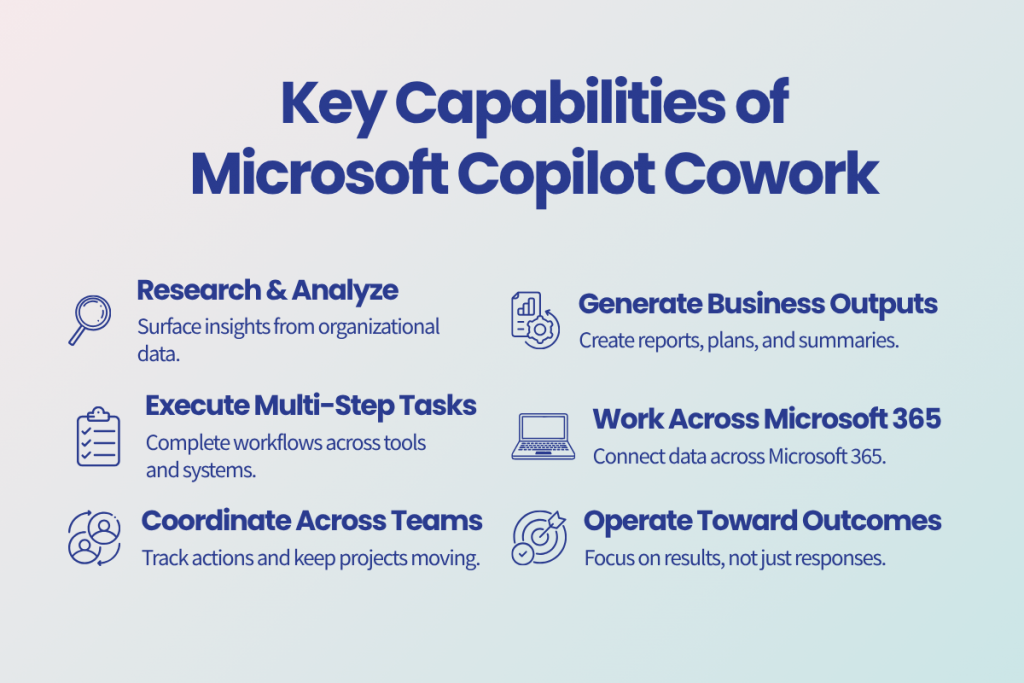
Microsoft positions Cowork as an AI experience capable of working across Outlook, Teams, SharePoint, OneDrive, meetings, files, and organizational knowledge to help complete business outcomes rather than individual tasks. Unlike traditional AI assistants that respond to a single prompt, Copilot Cowork is designed to complete multi-step tasks across Microsoft 365.
Consider a few real-world examples:
Preparing Executive Briefings
A leader preparing a board meeting could ask Cowork to gather relevant documents, review recent meeting notes, summarize key business updates, identify risks, and assemble a briefing package. Instead of spending hours tracking information across multiple systems, the leader receives a consolidated starting point for review.
Coordinating Project Updates
A project manager could ask Cowork to collect status updates from project documentation, summarize recent discussions, identify outstanding action items, and draft a stakeholder update. What might normally require checking multiple Teams conversations, emails, and documents can be coordinated in a single workflow.
Supporting Sales and Account Management
A sales leader preparing for a customer meeting could use Cowork to review previous communications, summarize account activity, identify open opportunities, and draft a meeting brief for the team. This reduces the time spent gathering context and allows more focus on customer conversations.
Creating Leadership Communications
An executive could ask Cowork to draft an internal announcement based on recent business updates, supporting documents, and meeting discussions. Rather than starting from a blank page, leaders can begin with a draft that already incorporates relevant organizational context.
Conducting Research and Analysis
Teams evaluating a new initiative could ask Cowork to gather information from internal documents, meeting content, and organizational knowledge, then produce an initial summary of findings, risks, and recommendations. This helps accelerate research while keeping employees focused on decision-making rather than information gathering.
Why This Shift Matters Right Now
Microsoft took Copilot Cowork generally available on June 16, 2026, after a three-month Frontier preview. During that preview, Microsoft reported that more than half of the Fortune 500 were already using the technology.
Organizations don’t move that quickly for a better chatbot. They move quickly when they see the potential to fundamentally change how work gets assigned, completed, and scaled.
Copilot Cowork signals Microsoft’s broader vision for a workplace where AI participates in the execution of work, not simply the creation of content. Leaders who understand that shift early will be better positioned to evaluate where AI can create meaningful business value and where human oversight remains essential.
How Is Copilot Cowork Different From Copilot Chat?
Many executives will initially view Copilot Cowork as a more advanced version of Copilot Chat.
That's understandable, but it misses the strategic significance.
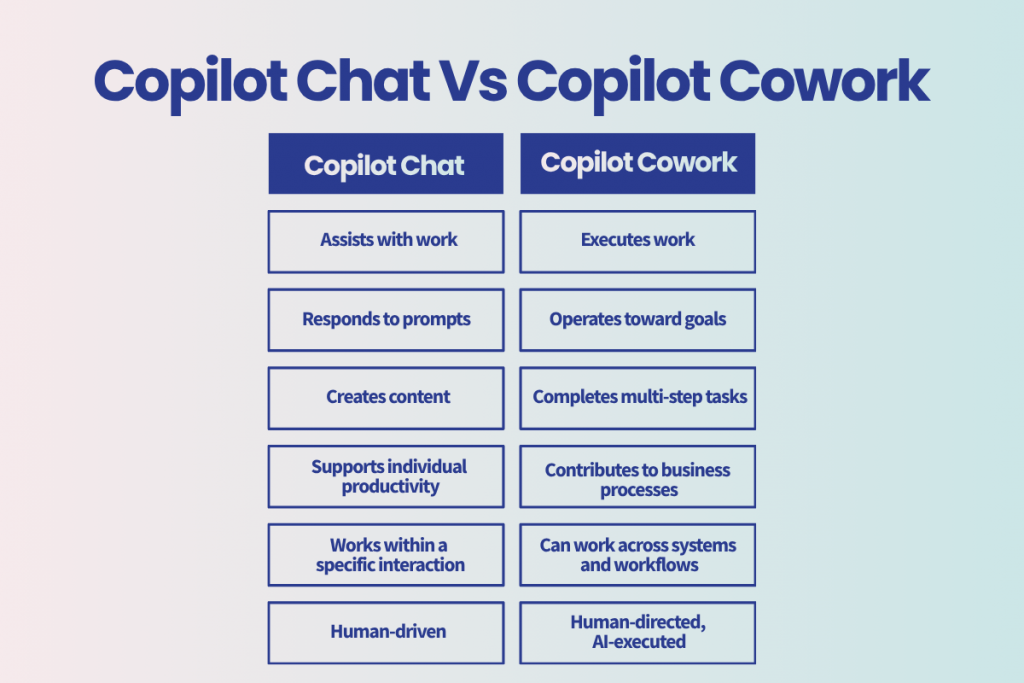
Traditional Copilot experiences help employees complete individual tasks. An employee asks a question, requests a summary, drafts a document, or generates content. The employee remains responsible for managing the process and deciding what happens next.
Copilot Cowork is designed to work toward a defined outcome. Rather than helping with a single task, it can coordinate multiple activities across Microsoft 365, gather information, create deliverables, schedule follow-up actions, and complete workflows on behalf of the user.
Consider a leadership team preparing for a quarterly business review. With Copilot Chat, a leader might ask for a summary of meeting notes, create a draft presentation, and generate talking points one step at a time. With Copilot Cowork, they could ask for a complete executive briefing package. Cowork could gather relevant documents, review recent communications, identify key risks and action items, assemble supporting materials, and draft the briefing for review.
The simplest way to think about it is this: Copilot Chat helps you do the work. Copilot Cowork helps complete the work.
The distinction may sound subtle. Strategically, it is not.
What About Licensing and Costs?
One of the biggest changes with Copilot Cowork is pricing.
Unlike traditional Microsoft 365 licensing, Cowork introduces usage-based billing through a system called Copilot Credits. Microsoft explains that Copilot Credits are the common currency used to measure and bill usage for services such as Cowork.
Organizations still require Microsoft 365 Copilot licensing for users, but Cowork activity is then billed separately based on the work performed.
Consumption is influenced by factors including:
- The AI models used
- Context retrieved from organizational data
- Tools and plugins called
- Task runtime and complexity
For business leaders, this creates a new conversation around AI governance and ROI. Rather than simply budgeting for licenses, organizations will need to monitor usage, understand value creation, and establish guardrails around AI consumption.
To learn more, check out our Microsoft Copilot Credits Explained blog.
Security, Governance, and Control Still Matter
Whenever AI becomes more capable, organizations naturally ask questions about security and governance.
Copilot Cowork operates within the existing Microsoft 365 security and compliance boundary and respects organizational permissions and controls. It also uses the same underlying access model organizations already used within Microsoft 365, meaning users can only access information they are authorized to see.
However, the same principle we've discussed with Copilot readiness still applies: AI reflects the environment it connects to.
In other words, AI doesn't solve information management problems. It exposes them. Organizations with strong governance, well-structured content, and clear ownership will see significantly better outcomes than those relying on AI to compensate for underlying issues.
What This Means for Business Leaders
Copilot Cowork is not simply a technology decision. It is an operating model decision.
As AI takes on a greater role in executing work, leaders will need to think differently about workforce enablement, governance, process design, and accountability. Teams may spend less time gathering information and managing routine tasks, and more time applying judgment, building relationships, and driving outcomes.
For executives, the opportunity is not simply improving productivity. It is rethinking how work gets done across the organization.
The Bottom Line
Copilot Cowork represents a significant step in Microsoft's AI strategy. It moves beyond helping employees create content and toward helping organizations execute work. While the technology is new, the questions facing leaders are familiar: How do we govern it? Where does it create value? How do we help people adapt?
The organizations that benefit most won't necessarily be the first to adopt Copilot Cowork. They'll be the ones that understand its strategic implications early and begin preparing before AI becomes embedded in everyday workflows.
Microsoft positions Cowork as a platform capable of working across Microsoft 365 data, business content, communications, and workflows. As AI evolves from assisting with work to helping execute it, leadership teams should already be thinking about what that means for their organization.
Questions worth asking now include:
- Is our information organized well enough to support AI-driven work?
- Are our governance policies mature enough?
- Do we have clear ownership of business content?
- Can we confidently explain how AI should and should not be used?
- Which business outcomes would benefit most from AI execution?
Organizations that establish the right foundation today will be best positioned to capture the value of AI as it becomes an increasingly active participant in how work gets done.
The next phase of AI isn't about generating better content. It's about helping organizations execute work in entirely new ways. The leaders who understand that shift now will be better prepared for what comes next.