Author
Prem Chandran

You Probably Have More InfoPath Than You Think
Most organizations don’t have a clean inventory of their InfoPath forms. That’s not a failure. It’s just the nature of how these forms were built over the years.
InfoPath was flexible. Departments could spin up forms without IT involvement. HR, Finance, Operations, they all built their own. Over time, those forms became embedded across SharePoint libraries, connected to workflows, and relied daily by people who may not even know what InfoPath is.
The result is a sprawl. And sprawl is hard to see until you go looking.
- Forms live across departments, often created by people who have since left the organization.
- There’s no central registry. InfoPath forms don’t show up neatly in a single admin console.
- Many forms are undocumented. The business logic (approvals, routing, conditional fields) lives inside the form itself, not in a spec sheet or process map.
Microsoft does offer a starting point: the Microsoft 365 Assessment Tool, which can scan your tenant for InfoPath usage. It won’t tell you everything, but it gives you a baseline to work from.
It’s Not Just About the Deadline
The retirement date is the headline, but the real risk is what happens underneath it.
InfoPath forms often contain embedded business logic, conditional rules, data connections, and approval routing your teams depend on. When those forms stop rendering, the impact goes beyond a broken page:
- Approval workflows stall. A procurement request that routes through three levels of sign-off simply stops moving.
- Data becomes inaccessible. Information submitted through InfoPath forms may be locked inside XML-based structures that can’t be easily opened without the form itself.
- Institutional knowledge disappears. If no one documented the logic behind a form, rebuilding it later means starting from scratch, without a blueprint.
- On-premises isn’t a safe harbour either. Microsoft will stop issuing InfoPath fixes for SharePoint Server 2016, 2019, and Subscription Edition. Future updates that break form rendering won’t be patched.
The forms themselves may look simple, but the processes behind them usually aren’t.
Don’t Rebuild Everything
Here’s where a lot of organizations make a costly mistake: they assume every InfoPath form needs to become a Power App. Microsoft recommends Power Apps, Power Automate, and Microsoft Forms as primary alternatives, and they’re great tools. But a one-to-one migration isn’t always the right move.
Some forms were built for processes that have changed. Some capture data no one uses anymore. Some are overly complex because they were designed around InfoPath’s limitations, not the needs of the business.
Not every form deserves the same investment. You’ll likely find forms that fall into a few natural categories:
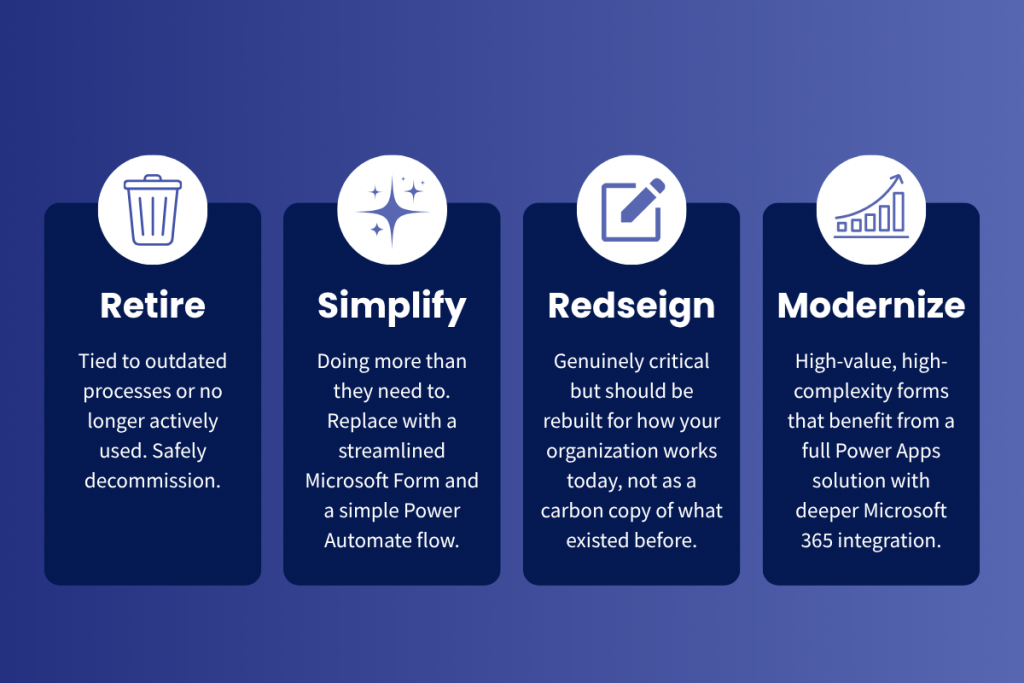
The goal isn’t to replicate what you had. It’s to end up with something better: simpler, easier to maintain, and align with how your teams actually work. Rebuilding every form exactly as it was is one of the most common, and most expensive, traps in any modernization effort.
Start With Clarity, Not Code
There’s no automated migration tool for InfoPath. Every form needs to be rebuilt manually. That can sound overwhelming, especially if you don’t yet know how many forms you have or how critical they are.
The first step isn’t development. It’s understanding.
Before anyone writes a line of code or builds a Power App, you need:
- An inventory. What InfoPath forms exist in your environment? Where do they live? Who uses them?
- A priority map. Which forms are business-critical? Which are low-risk? Which are already obsolete?
- A direction. For each form, what’s the right path: retire, simplify, redesign, or modernize?
That clarity is what turns a daunting migration into a manageable project with clear phases and realistic timelines.
Where Creospark Fits In
At Creospark, we help organizations make sense of transitions like this before jumping into action.
That starts with advisory: understanding what you have, where the risk sits, and what actually needs attention. From there, we help shape a strategy: which forms to retire, which to simplify, and which to rebuild with purpose. And when it’s time to build, we’re there for that too, with deep expertise in SharePoint, Power Apps, Power Automate, and the broader Microsoft 365 ecosystem.
We always start with the conversation, not the code.